C++ tutorial, C++ programs, C++ Exercises, C++ Example Programs

Saturday, March 24, 2018

C++ Program To Find Sum of Digits of Given Number

Q: Input an integer number. Find and show the sum of digits of given number.

      For example, if given number is 123 then answer will be Sum of digits = 6
      because 1+2+3 = 6.
         

C++ Program to find sum of digits of a number
Input Number Add its digits C++ Program

The Actual C++ Code of Add Digits of a given number Program


/*
Program to input a number, then display sum of its digits.
(c) Www.EasyCppProgramming.Blogspot.Com
*/
#include<iostream.h>
#include<conio.h>
#include<math.h>
void main()
{
     int num, temp, sum=0, r, q;
     clrscr();
     cout<<"Enter a number to add its Digits=";
     cin>>num;
     temp = num;
     while ( temp>0 )
     {
       q = temp/10;
       r = temp % 10;
       sum = sum + r;

       temp = q;
     }
     cout<<"\n The sum of digits of given number "<<num<<"  =  "<<sum;
     getch();
     }

Write C++ Program to find sum of digits of given number
Write C++ Program to find sum of digits of given number

The Working of  C++ Code of Add Digits of a given number Program

This program is of reverse number logic.

1. We will divide 123 by 10 and get quotient=12, r = 3
2. add r=3 into sum, so sum=3

3. Now put q =12 into dividend number
4. so divide 12 by 10, quotient=1 and remainder r=2.
5. Add r=2 into sum, so sum will become 5.
6. now put q=1 into dividend number

7. Now divide 1 by 10, quotient=0 and r=1.
8. so add r=1 into sum, and sum becomes 6
9. now put quotient=0 into dividend number called temp variable
10. so that while loop test condition while (temp>0) becomes false and loop terminates.

11. Therefore display the answer sum of digits of number 123 = 6

/*
Program to input a number, then display sum of its digits.
(c) Www.EasyCppProgramming.Blogspot.Com
*/
#include<iostream.h>     // include header files
#include<conio.h>

void main()
{
     int num, temp, sum=0, r, q;
     clrscr();
     cout<<"Enter a number to add its Digits=";
     cin>>num;                 // input number
     temp = num;             // copy number into temp variable
     while ( temp>0 )      // loop while temp is greater than zero
     {
       q = temp/10;      // calculate quotient = temp number / 10, if num is 123 then q=12
       r = temp % 10;  //  calculate remainder r = 123 % 10, r = 3
       sum = sum + r;  // sum = 0 + 3; so last digit 3 of 123 is added in sum variable
                               
       temp = q;      // set next time dividend     temp=12
     }
     cout<<"\n The sum of digits of given number "<<num<<"  =  "<<sum; //sum=6
     getch();
     }
Share:

Friday, March 23, 2018

C++ Program To Calculate Area and Circumference of Circle in C Plus Plus Program

Easyway How To Write a Program in C++ for Calculating Area and Circumference of Circle

Program Statement: Write a C++ program to input radius of a circle and calculates and prints the area and circumference of the given circle.
Calculate area and circumference of circle in C++ Program Easyway


What are the Formulas Used in C++ Program for Area and Circumference of Circle?

To write this program, first of all we have to find the accurate formulas for area and circumference of circle.
These are as follows:
  1. area of circle = Î  R 2
  2. circumference of circle =  2 Π R

How Formulas of Circle are Transformed into C++ Arithmetic Expressions

In C++ programming, we write the above formulas as follows
  1. area = 3.14 * radius * radius
  2. circum = 2 * 3.14 * radius
Note: 3.14 is the vale of constant PI  shown with symbol Π

A Better Programming Approach is to Use Symbolic Constants instead of hard coding numbers directly in C++ programs.

How To Define a Constant PI in C++ (C++ Program 

for Calculating Area and Circumference of  Circle

There are two ways:
  1. Using #define Pre processor Directive:     #define PI  3.14
  2. Using const Qualifier :                             const float PI = 3.14;

C++ Source Code for Calculating Area and Circumference of  Circle

#include<iostream.h>
#include<conio.h>
#include<iomanip.h>
#define PI 3.14
void main()
{

   float radius, area, circum;
   clrscr();
    cout<<"Enter radius of circle = ";
    cin>>radius;
    area = PI * radius * radius;
    circum = 2 * PI * radius;
   
    cout<<"Area of  circle = "<<setprecision(2)<<area<<endl;
    cout<<"Circumference of circle = "<<setprecision(2)<<circum;

    getch();
}

How This Program Works for Calculating Area and Circumference of  Circle

#include<iostream.h>  // include header file for cin, cout
#include<conio.h>     // include header file for  clrscr() 
#include<iomanip.h>  // include header file for setprecision()
#define PI 3.14   // define constant PI
void main()
{

   float radius, area, circum;   declare variables
   clrscr();
    cout<<"Enter radius of circle = ";
    cin>>radius;           //input radius
    area = PI * radius * radius;   // calculate area
    circum = 2 * PI * radius;   // calculate circumference
   
   // used setprecision(2) to show value of area upto two decimal places
   cout<<"Area of  circle = "<<setprecision(2)<<area<<endl;

   // used setprecision(2) to show value of circumference upto two decimal places
    cout<<"Circumference of circle = "<<setprecision(2)<<circum;

    getch();
}


Share:

C++ Program to Calculate Bonus on Salary Grade Wise


Q: Write a C++ Program To Calculate Bonus on Salary Grade Wise

Program Statement: Write a C++ Program to input salary and grade. it applies a 60% bonus to employees of grade 17 or above. It adds a 30% bonus for all employees of grade less than 17.

C++ Program to Calculate Bonus on Salary Grade Wise
Salary Bonus C|++ Program

Source code of Salary Program for Dev C++ and Modern C++ Compilers / IDEs

#include<iostream>

using namespace std;

int main()
{
 float salary,bonus;
 int grade;
 
 cout<<"Enter salary of Employee=";
 cin>>salary;
 cout<<"Enter grade=";
 cin>>grade;

 if(grade>=17)
   bonus = salary * 60.0/100.0;
   else
   bonus = salary * 30.0/100.0;
 salary = salary + bonus;
 cout<<"The Total salary of Employee = "<<salary;

 return 0; 
 }

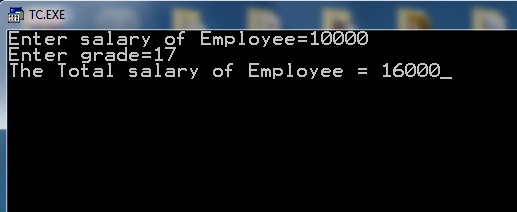
Sample output of Salary Grade Bonus Program

Enter salary of Employee=10000
Enter grade=17
The Total salary of Employee = 16000
--------------------------------
Process exited after 26.75 seconds with return value 0
Press any key to continue . . .

C++ Source Code of  Program To Calculate Bonus on Salary for Turbo C++ 3.0 IDE / Compiler

#include<iostream.h>
#include<conio.h>

void main()
{
 float salary,bonus;
 int grade;
 clrscr();
 cout<<"Enter salary of Employee=";
 cin>>salary;
 cout<<"Enter grade=";
 cin>>grade;

 if(grade>=17)
   bonus = salary * 60.0/100.0;
   else
   bonus = salary * 30.0/100.0;
 salary = salary + bonus;
 cout<<"The Total salary of Employee = "<<salary;

  getch();
 }


Output of Sample Run: Salary Bonus C ++ Program

Calculate Salary with Bonus according to Grade C++ Program


How Salary Bonus C++ Program Works: Logic

#include<iostream.h>      //include header files
#include<conio.h>

void main()       
{
 float salary,bonus;       
 int grade;
 clrscr();
 cout<<"Enter salary of Employee=";      
 cin>>salary;                   // Enter salary
 cout<<"Enter grade=";          
 cin>>grade;                   // input grade

   // check if grade greater than or equal to 17

 if(grade>=17)            
   bonus = salary * 60.0/100.0;    //  calculate 60% bonus
   else
   bonus = salary * 30.0/100.0; // calculate 30% bonus
 salary = salary + bonus;     // add bonus to salary

// print salary
 cout<<"The Total salary of Employee = "<<salary;

//for staying output window until the user presses a key  getch();   
 }

Share:

Thursday, March 22, 2018

Program Area of Triangle Algorithm Flowchart

Q: Write a C++ Program to input three sides of a triangle. The program then calculates the Area of triangle by the formula 
Formula of area of triangle when 3 sides given
Where s = ( a+b+c ) / 2

Write Down Algorithm of C++ Program Area of Triangle

1. Start
2. Input a,b,c
3. Calculate s = (a + b + c ) / 2
4. Calculate area = sqrt( s*(s-a)*(s-b)*(s-c))
5. print "Area of Triangle=", area
6. End


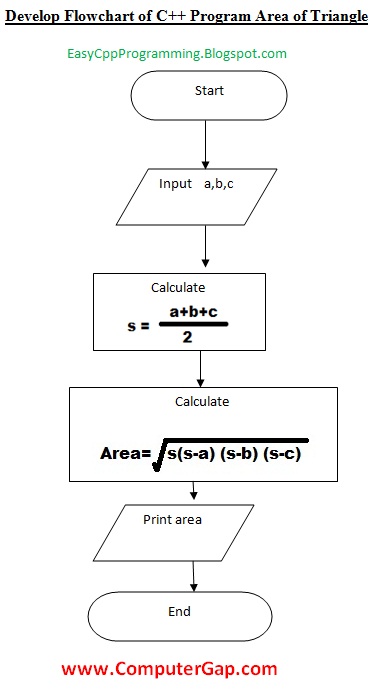
Develop Flowchart of C++ Program Area of Triangle

C++ Program develop flowchart c plus plus program area of triangle
develop flowchart c plus plus program area of triangle

Generally we prepare a flowchart and algorithm which is independent of  any programming language so here is a better flowchart version for C++ Program Area of Triangle with mathematical formula instead of C++ arithmetic expressions.

Flowchart for C++ Program How To Calculate Area of triangle when 3 side are input


develop flowchart c plus plus program area of triangle programming language independent

Source code for modern C++ IDEs /Compilers ( Used Dev C++ )

#include<iostream>
#include<math.h>

using namespace std;
int main( )
{
float a,b,c,s,area;

cout<<"Enter side A of triangle = ";
cin>>a;
cout<<"Enter side B of triangle = ";
cin>>b;
cout<<"Enter side C of triangle = ";
cin>>c;

s = (a + b + c ) / 2;

area = sqrt ( s * (s - a ) * (s - b ) * (s - c ) ) ;

cout<< "Area of Triangle = "<<area;
return 0;

}

Output of the sample run:

Enter side A of triangle = 5
Enter side B of triangle = 5
Enter side C of triangle = 5
Area of Triangle = 10.8253
--------------------------------
Process exited after 4.697 seconds with return value 0
Press any key to continue . . .

Write Down Source Code of C++ Program Area of Triangle for Turbo C++ 3.0 Compiler / IDE

#include<iostream.h>
#include<conio.h>
#include<math.h>
void main( )
{
float a,b,c,s,area;
clrscr();
cout<<"Enter side A of triangle = ";
cin>>a;
cout<<"Enter side B of triangle = ";
cin>>b;
cout<<"Enter side C of triangle = ";
cin>>c;

s = (a + b + c ) / 2;

area = sqrt ( s * (s - a ) * (s - b ) * (s - c ) ) ;
cout<< "Area of Triangle = "<<area;

getch();
}

Share:

Wednesday, March 21, 2018

C++ Program Temperature Conversion Celsius To Fahrenheit Formula


The formula for converting temperature in Celsius to Fahrenheit is:
f=9.0/5.0 * c + 32;

It means that User input = temperature in Celsius
and output is temperature in Fahrenheit.
Easyway Temperature Conversion C++ Program Celsius Into Fahrenheit Scale Formula - C++ Source Code

Easyway Temperature Conversion C++ Program Celsius Into Fahrenheit Scale Formula - C++ Source Code


Easyway Temperature Conversion C++ Program Celsius Into Fahrenheit Scale Formula - C++ Source Code

//Turbo C++ 3.0 IDE Easyway C++ Programs
#include<iostream.h> 
#include<conio.h>
void main()
{ 

float c,f;

cout<< "Enter Temperature in Celsius= ";

cin>>c;

f=9.0/5.0 * c + 32;

cout<<"Temperature in Fahrenheit="<<f;

getche();
} 


Output Result of  Temperature Conversion C++ Program Celsius Into Fahrenheit Scale Formula - C++ Source Code

Output Result of  Temperature Conversion C++ Program Celsius Into Fahrenheit Scale Formula - C++ Source Code

Output Result of  Temperature Conversion C++ Program Celsius Into Fahrenheit Scale Formula - C++ Source Code

You would also like to view:

Write A C++ Program To Convert Fahrenheit Temperature Into Centigrade with formula c= 5.0 / 9.0 x (f - 32)

Program Temperature Conversion Algorithm Flowchart

Share:

Write a C++ Program To Check a Number For Even Odd Using Conditional Operator Ternary Operator

Here is the C++ source code  for the program that will input an integer number and will
check this number whether it is even or odd. But this program will not use if else statement for checking this number for even / odd. Rather it will use C++ Conditional operator / Ternary operator for this purpose as shown in the following figure of the even odd program using ternary operator:

Easyway C++ Program to check a number for even odd using conditional operator or ternary operator
Here is the C++ program:

#include<iostream.h>
#include<conio.h>
void main()
{
    int n;
   clrscr();
    cout<<"Enter a number to check for Even / Odd = ";
    cin>>n;
    (n%2==0) ? cout<<"Number is Even" : cout<<"Number is odd";
    getch();
}


A sample execution of the program even odd with conditional operator is as follows:

when user enters 10 the output will be Number is Even
and when user enters 111 then output message shown will be Number is Odd.


Program C++ To Check number even or odd with ternary operator / conditional operator output

Explanation of Logic behind : Even / Odd Program i C++ with Ternary Operator or Conditional Operator

The main statement of this program is using Conditional operator. 

The conditional operator has the syntax:

(condition)? case_if_true : case_if_false ;

Working of Conditional Operator

The condition will be checked first of all, if condition is true then first statement is executed otherwise second statement is executed, as shown in the following line of code.
{ 
Note: here in true_case and false_case we can use only:
 arithematic expression, constant value, input / output statement;
}

(n%2==0) ? cout<<"Number is Even" : cout<<"Number is odd";

so if we enter 10

condition becomes 10%2==0  

We know that % gives remainder so 10%2 will give zero

so condition becomes 0 == 0 which is true 

so first statement is executed and output message is displayed: Number is Even.


Share:

Saturday, March 17, 2018

C Plus Plus Program to Calculate Factorial of Number Using Do While Loop

Program To Calculate Factorial of a Number Using do ... while Loop

Program To Calculate Factorial of a Number Using do ... while Loop

 What is Factorial?


factorial of a number is calculated by multiplying all the integer numbers from given number n to 1.
For example, factorial of  3 = 3 x 2 x 1.

What is do while Loop in C++ ?


do while loop is the third loop provided by C++. First two are for loop and while loop. The do while loop is used to execute a set of one or more statements repeatedly as long as the given condition remains true.

The main difference between while loop and do while loop is that

 the syntax of do while loop places the condition after the body of loop. The effect of this is that the loop body of do while loop is executed at least once irrespective of the given condition for loop is true or false for first time.

The syntax of do while loop is:


   do
   statement;
  while  ( condition );

   or for a set two or of statements the syntax of do while loop will be as follows:

   do
  {
     statement 1;
     statement 2;
     .
     .
     .
    statement n;
  }
   while ( condition );

Simple example of do while loop to display first 5 numbers 1 to 5


  int i=1;
  do
   {
      cout<<i<<endl;
      i++;
    }
     while ( i<=5 );

  output:
    1
    2
    3
    4
    5

Now we start writing the the program to calculate factorial of a number provided by the user at runtime using do ... while loop

// This program will calculate factorial of a given number provided //by user at run time using do while loop
#include<iostream.h>
#include<conio.h>

void main( )

  {
         int num,  i, fact;
         clrscr( );
         cout<<"Enter a number to calculate Factorial=";
         cin>>num;
         fact= 1;
         i = 1;
         do
             {
                 fact = fact * i;
                 i++;
             } 
              while ( i <= num );
          
           cout<<"Factorial of = "<<num<< " = "<<fact;
           getche();
      }


Sample Output of  Program To Calculate Factorial of a Number Using do ... while Loop

Enter a Number to Calculate Factorial: 4
Factorial of 4 = 24


More Programs of Factorial are as follows:


Factorial By For Loop Statement

 Program Factorial by While Loop Logic


Share:

Thursday, July 17, 2014

Download and Install Turbo C++ Full Screen IDE for Windows 7 Vista

Today we will discuss How to Download and Install Turbo C++ With Full Screen IDE for Windows 7 and Vista.

What is Turbo C++?

Turbo C++ 3.0 is the most popular OLD is GOLD Compiler for C language and C++ Language. in many countries students, normally, use Turbo C++ 3.0 for learning C / C++ programming.
They write their first C Language Program or C++ Program in Turbo C IDE. You can download and install Turbo C++ 3.0 in easy steps as follows:

Link for Download and Install Turbo C++ With Full Screen IDE for Windows 7 and Vista


Download and Install Turbo C++ With Full Screen IDE for Windows 7 and Vista
How to Download and Install Turbo C++ With Full Screen IDE for Windows 7 and Vista
Download and Install Turbo C++ With Full Screen IDE for Windows 7 and Vista

How To Install Turbo C++ With Full Screen IDE for Windows 7 and Vista.

     
     After you have downloaded the Turbo C++ installation zip file from mediafire website , extract this file.

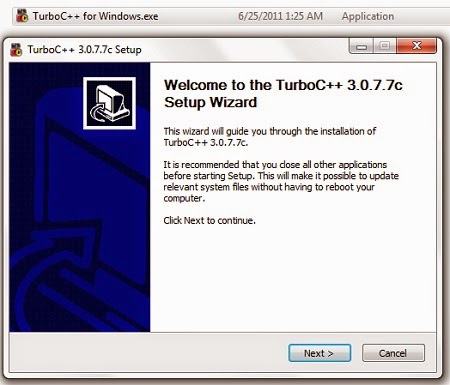
    Double click on the Turbo C++ installation file to start setup. Click on Next button.
    Images are given below to guide you the Installation Process of Turbo C++ IDE.
     
    Download and Install Turbo C++ Compiler With Full Screen IDE for Windows 7 and Vista
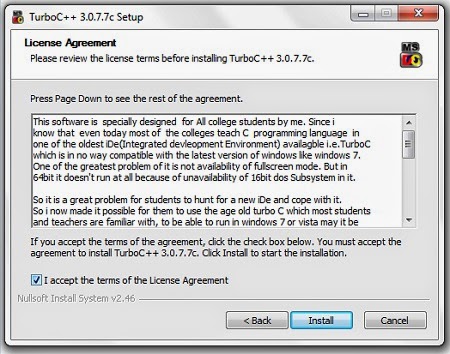
    Accept the terms and click on install button.

    Download and Install Turbo C++ With Full Screen IDE for Windows 7 and Vista step 2
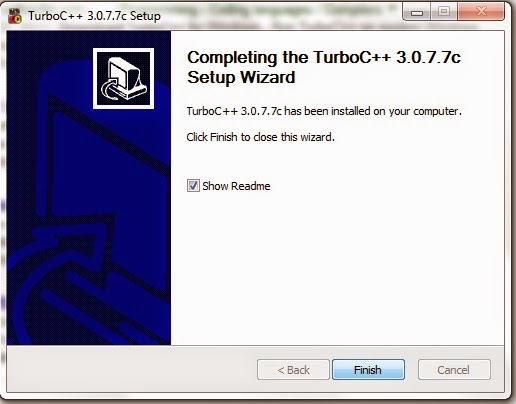
    Click on Finish button to end the setup. Congratulations! Now you can learn C++ computer programming in Turbo C++ IDE. You can write and run your first C++ Program in Turbo C IDE.

    steps to Download and Install Turbo C++ With Full Screen IDE for Windows 7 and Vista step 3

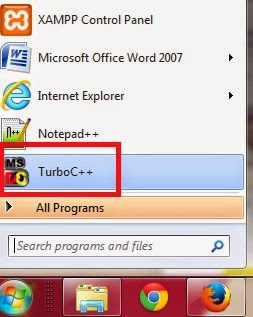
    Click on start button and click on Turbo C++ icon.

    How To Run Turbo C++ With Full Screen IDE for Windows 7 and Vista
    Click on File menu and select New.

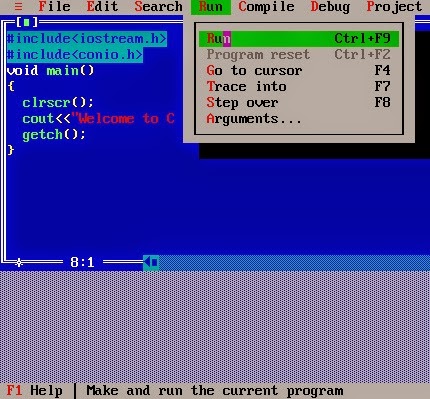
    How To Write First Program in Turbo C++ With Full Screen IDE for Windows 7 and Vista

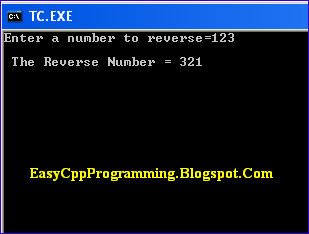
    Type the first program as shown in the above picture. Click on RUN menu and select Run command. The output of the program will be shown as the following picture:

    output in Turbo C++ With Full Screen IDE for Windows 7 and Vista
    End of the C++ Tutorial How To Download, Install Turbo C++ With Full Screen IDE for Windows 7 and Vista and Write and Run First Program
    Share:

    Tuesday, June 10, 2014

    C Plus Plus Program Conversion of Hours into Weeks Days Hours

    Today, we are going to discuss a simple program logic that uses only input, output and assignment statements along with variable declarations.

    Points of Discussion are:
    Easyway How to write c++ program convert hours into weeks days hours
    Easyway How to write c++ program convert hours into weeks days hours

    • C++ Program: Input Hours Convert into Weeks, Days and Hours.
    • Algorithm of the Hours Conversion Program
    • C++ Code of the Hours Conversion Program.
    • Understanding Logic of The Hours into Week, Day and Hours Program
    C Plus Plus to convert hours into weeks days and hours
    C Plus Plus to convert hours into weeks days and hours

    ALGORITHM : Hours Conversion

    This algorithm is used to input hours and convert into weeks, days and hours.
    1. Start
    2. Input Hours
    3. Calculate Weeks = Hours / 168
    4. Calculate Hours = Hours Mod 168
    5. Calculate Days = Hours / 24
    6. Calculate Hours = Hours Mod 24
    7. Display "Weeks=", Weeks
    8. Display "Days=", Days
    9. Display "Hours =", Hours
    10. End

    C++ Code: Program Hours Conversion into Weeks, Days and Hours.

    /* This program is used to input hours from the user. Then this algorithm "Hours Conversion" will convert hours into weeks, days and hours.*/
    #include<iostream.h>
    #include<conio.h>

    void main()
    {
          clrscr();
          int h, w, d, hrs;
          cout<<"Enter Hours=";
          cin>>hrs;
          h = hrs;
          w = hrs / 168;
          hrs = hrs % 168;
          d = hrs / 24;
          hrs = hrs % 24;
          cout<<"Total Hours input = "<<h<<endl;
          cout<<"Weeks ="<<w<<endl;
          cout<<"Days ="<<d<<endl;
          cout<<"Hours ="<<hrs;
          getch();
    }

    OUTPUT of Sample Run of The Program Hours Conversion


    Enter Hours= 200
    Total Hours input =200
    Weeks = 1
    Days =1
    Hours =8


    Logic of The Program Hours Conversion


    We know that:
    1 day = 24 hours
    so 1 week = 24 x 7 = 168 hours

    Therefore we will divide total hours by 168 to get weeks.
    weeks = 200 / 168 will give 1 week.
    Now to calculate remaining hours we will get remainder of the division 200 % 168
    This will give remaining hours = 32

    To get days, we will divide remaining hours by 24
    so 32 / 24 will give 1 day.

    Now we will calculate remaining hours by remainder 32 % 24 that will give the result 8 hours.

    So the output 1 week, 1 day and 8 hours.

    If you enjoyed the C++ Learning Through Example program Logic Understanding, Please share this blog on Social media. Thanks!
    Share:

    Sunday, February 16, 2014

    Convert a Number into Reverse Number Program in C Plus Plus

    C++ Reverse Number Conversion Program Logic

    Reverse Number Program logic in C Plus Plus using While Loop
    Reverse Number Program in C Plus Plus using While Loop

    Q: Write a C++ Program to input an integer number and display its Reverse Number. For example if the input is the number 123, the Reverse Number will be 321.

    Reverse Number Logic in common programming is very important. Although, it is difficult for beginner programmers, you must learn and understand REVERSE NUMBER Program in C++ or JAVA. This will be helpful for further improvements in your programming logic.

    Reverse the input number program in C++
    Reverse the input number program in C++
    • First of all we suppose that the number entered is 123.
    •  Let the given number num = 123
    • Copy the number in temporary variable temp so that temp = 123

    First Iteration of While Loop

    • We start a while loop with condition temp>0. Since temp=123 so loop will start for first time.
    • Now we will divide number 123 by 10 so that the remainder R = 3 and Quotient Q = 12
    • Put the values in statement rev = rev * 10 + R
    • rev = 0 * 10 + 3
    • rev = 3
    • Assign the value of Quotient Q to temp so that temp = 12 now.
    • Since temp 12 is >0, so the while loop will execute again.
    •  

    Second Iteration of While Loop

    • Now we will divide number temp 12 by 10 so that the remainder R = 2 and Quotient Q = 1
    • Put the values in statement rev = rev * 10 + R
    • rev = 3 * 10 + 2
    • rev = 30+2
    • rev = 32
    • Assign the value of Quotient Q to temp so that temp = 1 now.
    • Since temp 1 is >0, so the while loop will execute again.

     Third Iteration of While Loop

    •  Now we will divide number temp 1 by 10 so that the remainder R = 1 and Quotient Q = 0
    • Put the values in statement rev = rev * 10 + R
    • rev = 32 * 10 + 1
    • rev = 320+1
    • rev = 321
    • Assign the value of Quotient Q to temp so that temp = 0 now.
    • Since temp 0 is not >0, so the condition temp>0 will evaluate to false so that the while loop will terminate.
    While loop reverse a number program C++
    While loop reverse a number program

    Conclusion

           So the Required Reverse Number is 321.


    The Actual C++ Code of Reverse Number Program


    /*
    Program to input a number, then display its Reverse number.
    (c) Www.EasyCppProgramming.Blogspot.Com
    */


    #include<iostream.h>
    #include<conio.h>
    #include<math.h>
    void main()
    {
         int num, temp, rev=0, R, Q;

         clrscr();

         cout<<"Enter a number to reverse=";

         cin>>num;

         temp = num;

         while ( temp>0 )

         {

           Q = temp/10;
           R = temp % 10;
           rev = rev*10 + R;

           temp = Q;

         }

         cout<<"\n The Reverse Number = "<<rev;
         getch();

         }
    Share:

    EasyCPPprogramming.blogspotcom

    Labels